ASP.NET Core Middleware in .NET 10: Comprehensive Guide to the Request Pipeline
ASP.NET Core middleware is one of the most important concepts to understand when building modern web applications and REST APIs with .NET 10. Middleware components allow you to process HTTP requests and responses, implement cross-cutting concerns, control application behavior, and customize the ASP.NET Core request pipeline.
Authentication, authorization, exception handling, logging, CORS, HTTPS redirection, rate limiting, static files, and response compression are all common examples of functionality implemented through middleware.
In this tutorial, you will learn what ASP.NET Core middleware is, how the request pipeline works, how middleware executes, how to create custom middleware, how to short-circuit requests, and how to choose between middleware, filters, and endpoint filters.
What Is ASP.NET Core Middleware?
ASP.NET Core middleware is a software component that participates in processing an HTTP request and response.
A middleware component can:
- Inspect an incoming request.
- Modify the request.
- Perform authentication or authorization checks.
- Log request information.
- Call the next middleware component.
- Modify the outgoing response.
- Stop the request pipeline early.
- Handle exceptions.
- Add or modify response headers.
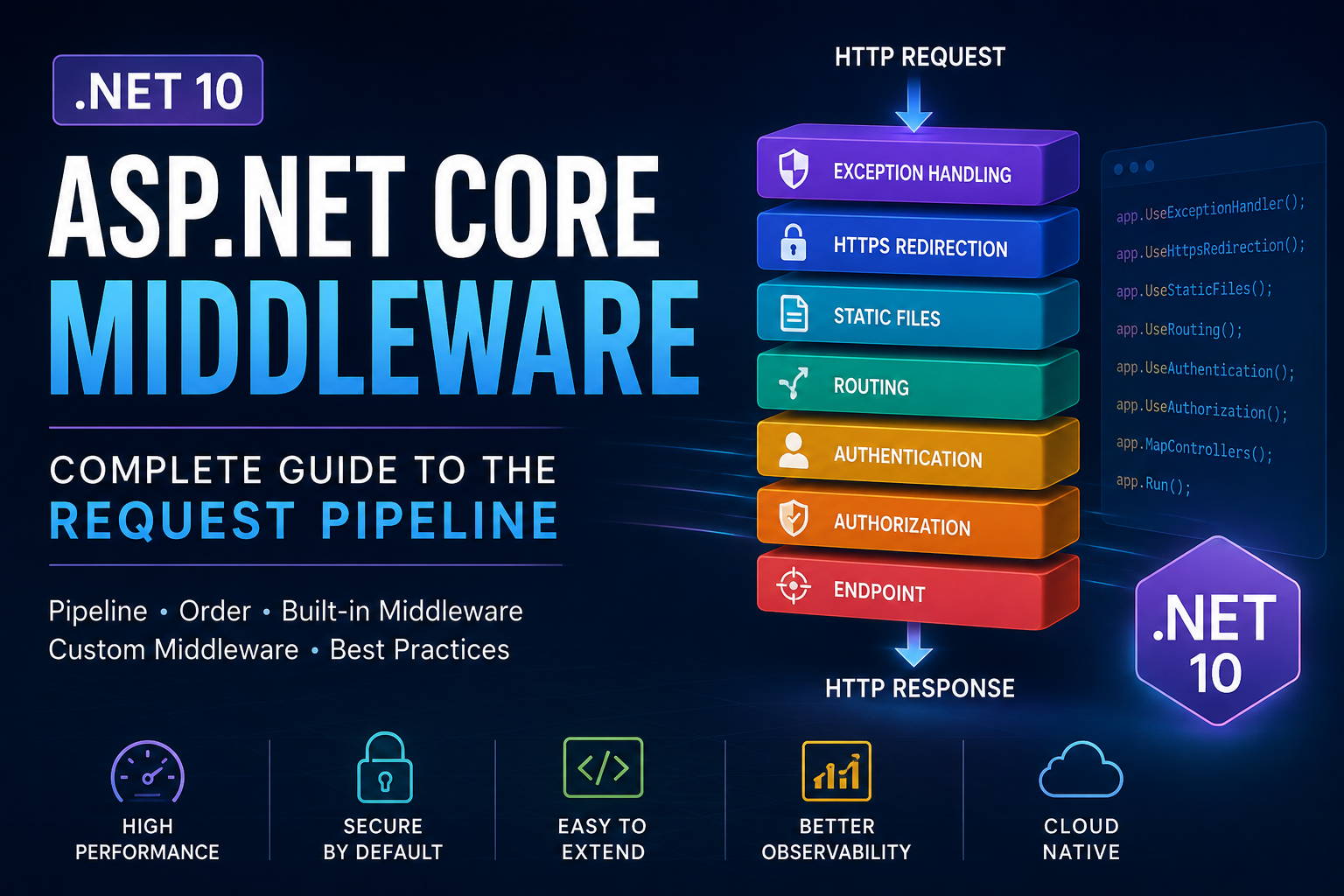
The middleware components are connected together to form an HTTP request pipeline.
A simplified pipeline looks like this:
HTTP Request
     ↓
Exception Handling
     ↓
HTTPS Redirection
     ↓
Static Files
     ↓
Routing
     ↓
Authentication
     ↓
Authorization
     ↓
Endpoint
     ↓
HTTP Response
Each middleware component gets an opportunity to process the request before passing control to the next component.
Understanding the ASP.NET Core Request Pipeline
The request pipeline is essentially a chain of middleware components.
When a request enters your ASP.NET Core application, it travels through the middleware registered in Program.cs.
For example:
var builder = WebApplication.CreateBuilder(args);

var app = builder.Build();

app.UseHttpsRedirection();

app.UseRouting();

app.UseAuthentication();

app.UseAuthorization();

app.MapControllers();

app.Run();
Here, the application creates a pipeline containing several components.
When a request arrives, middleware executes from top to bottom.
However, middleware can also execute code after the next component finishes.
Consider:
app.Use(async (context, next) =>
{
    Console.WriteLine("Before");

    await next();

    Console.WriteLine("After");
});
If another middleware follows it, the execution can be visualized as:
Middleware A
    Before
        ↓
Middleware B
    Before
        ↓
Endpoint
        ↓
Middleware B
    After
        ↓
Middleware A
    After
This is sometimes described as a nested pipeline.
Understanding this behavior is essential when working with logging, exception handling, response headers, timing, and other ASP.NET Core middleware scenarios.
How Middleware Works
A middleware component normally receives two important objects:
HttpContextRequestDelegate
A typical middleware looks like this:
app.Use(async (context, next) =>
{
    // Code before the next middleware

    await next();

    // Code after the next middleware
});
The next delegate represents the next component in the pipeline.
Calling:
await next();
passes control to the next middleware.
If you don’t call next(), the pipeline stops at that point.
This behavior is called short-circuiting.
RequestDelegate in ASP.NET Core
RequestDelegate represents a method that processes an HTTP request.
Its signature is essentially:
public delegate Task RequestDelegate(HttpContext context);
You will commonly see it in custom middleware:
public async Task InvokeAsync(
    HttpContext context,
    RequestDelegate next)
{
    await next(context);
}
The delegate receives the current HttpContext and returns a Task.
This allows middleware components to execute asynchronously without blocking application threads.
Understanding HttpContext
HttpContext contains information about the current HTTP request and response.
For example:
var method = context.Request.Method;
var path = context.Request.Path;
var user = context.User;
You can access request headers:
var userAgent = context.Request.Headers.UserAgent;
You can also modify response headers:
context.Response.Headers["X-App-Version"] = "1.0";
Some commonly used HttpContext properties include:
| Property | Purpose |
|---|---|
Request | Information about the incoming request |
Response | Information about the outgoing response |
User | Current authenticated user |
RequestServices | Access to the request’s service provider |
Items | Store data during the current request |
Connection | Connection information |
TraceIdentifier | Unique identifier for the request |
For example, middleware can attach information to HttpContext.Items:
context.Items["RequestStarted"] = DateTime.UtcNow;
Later middleware can retrieve it:
var started = context.Items["RequestStarted"];
Middleware Execution Order
Middleware execution order is extremely important in ASP.NET Core.
The order in which middleware is registered in Program.cs determines how requests travel through the pipeline.
For example:
app.UseAuthentication();
app.UseAuthorization();
Authentication should normally execute before authorization because authorization needs the authenticated user information.
A typical API application might have a structure similar to:
var app = builder.Build();

if (!app.Environment.IsDevelopment())
{
    app.UseExceptionHandler("/error");
}

app.UseHttpsRedirection();

app.UseRouting();

app.UseCors();

app.UseAuthentication();

app.UseAuthorization();

app.MapControllers();

app.Run();
The exact pipeline depends on your application, but the important rule is:
Middleware order matters.
Moving a middleware to the wrong position can result in authentication failures, incorrect CORS behavior, missing headers, routing problems, or unexpected responses.
A Common Authentication Ordering Problem
Consider:
app.UseAuthorization();

app.UseAuthentication();
This is usually incorrect because authorization is executing before authentication has established the current user.
The normal order is:
app.UseAuthentication();

app.UseAuthorization();
This small ordering difference can cause confusing 401 and 403 responses.
When debugging middleware problems, always inspect the order in which components are registered.
Built-In Middleware in ASP.NET Core
ASP.NET Core provides many built-in middleware components so you don’t have to implement common infrastructure yourself.
Common examples include:
- Exception handling
- HTTPS redirection
- Static files
- Routing
- CORS
- Authentication
- Authorization
- Response compression
- Output caching
- Rate limiting
Using built-in middleware is generally preferable to creating your own implementation when the framework already provides the functionality you need.
Exception Handling Middleware
Exception handling is one of the most important uses of middleware.
Instead of adding try/catch blocks to every controller action, you can configure centralized exception handling.
For example:
if (!app.Environment.IsDevelopment())
{
    app.UseExceptionHandler("/error");
}
This allows unhandled exceptions to be processed centrally.
For APIs, centralized exception handling is particularly useful because you can return a consistent error response.
Modern ASP.NET Core applications can also use Problem Details for standardized HTTP API errors.
For example:
builder.Services.AddProblemDetails();
Then:
app.UseExceptionHandler();
This helps APIs return structured error information instead of exposing internal exception details.
Routing Middleware
Routing determines which endpoint should handle an incoming request.
In applications where explicit routing middleware is needed, you may see:
app.UseRouting();
Routing information becomes available through HttpContext.
For example:
var endpoint = context.GetEndpoint();
You can inspect endpoint metadata from middleware:
var endpoint = context.GetEndpoint();

if (endpoint != null)
{
    Console.WriteLine(endpoint.DisplayName);
}
This is useful when middleware needs to make decisions based on the selected endpoint.
Authentication Middleware
Authentication determines who the current user is.
Configure authentication services:
builder.Services.AddAuthentication();
Then add authentication middleware:
app.UseAuthentication();
Authentication can populate:
HttpContext.User
with the user’s claims and identity.
For example:
var userName = context.User.Identity?.Name;
Authorization Middleware
Authorization determines whether an authenticated user has permission to access a resource.
Register it after authentication:
app.UseAuthentication();
app.UseAuthorization();
For example, a controller might contain:
[Authorize]
public IActionResult GetOrders()
{
    return Ok();
}
The authorization middleware participates in enforcing the endpoint’s authorization requirements.
HTTPS Redirection Middleware
HTTPS redirection redirects HTTP requests to HTTPS.
Enable it with:
app.UseHttpsRedirection();
This is commonly included in web applications and APIs that should require secure communication.
CORS Middleware
Cross-Origin Resource Sharing, or CORS, controls whether browsers can make requests from one origin to another.
Configure a policy:
builder.Services.AddCors(options =>
{
    options.AddPolicy("Frontend", policy =>
    {
        policy
            .WithOrigins("https://example.com")
            .AllowAnyHeader()
            .AllowAnyMethod();
    });
});
Then add the middleware:
app.UseCors("Frontend");
CORS configuration should be deliberately restricted in production rather than automatically allowing every origin.
Response Compression Middleware
Response compression can reduce the size of HTTP responses.
Register compression services:
builder.Services.AddResponseCompression();
Then enable the middleware:
app.UseResponseCompression();
This can reduce bandwidth usage and improve response performance for suitable response types.
Output Caching Middleware
ASP.NET Core provides output caching capabilities that can cache generated responses and reduce unnecessary processing.
Register the service:
builder.Services.AddOutputCache();
Then enable the middleware:
app.UseOutputCache();
You can apply output caching to endpoints according to your application’s requirements.
For example:
app.MapGet("/products", () =>
{
    return Results.Ok(new[]
    {
        "Laptop",
        "Keyboard",
        "Mouse"
    });
})
.CacheOutput();
Output caching can be useful for data that doesn’t change frequently.
However, avoid blindly caching personalized responses, authentication-dependent data, or sensitive information.
Rate Limiting Middleware
Rate limiting protects applications from excessive requests.
Register the rate limiter:
builder.Services.AddRateLimiter(options =>
{
    options.AddFixedWindowLimiter("fixed", limiterOptions =>
    {
        limiterOptions.PermitLimit = 100;
        limiterOptions.Window = TimeSpan.FromMinutes(1);
    });
});
Enable it:
app.UseRateLimiter();
Then apply the policy to an endpoint:
app.MapGet("/api/products", () =>
{
    return Results.Ok();
})
.RequireRateLimiting("fixed");
Rate limiting is particularly useful for public APIs, authentication endpoints, search endpoints, and other resources that could be abused by excessive requests.
Static Files Middleware
If your application serves static files such as CSS, JavaScript, images, or other assets, you can use:
app.UseStaticFiles();
Files placed in the application’s wwwroot directory can then be served as static resources.
For example:
wwwroot/
├── css/
├── js/
└── images/
Static file middleware can terminate the request when a matching static file is found.
Creating Custom ASP.NET Core Middleware
Sometimes your application requires functionality that isn’t available through the built-in middleware.
Examples include:
- Request ID tracking
- Custom logging
- Tenant resolution
- API key processing
- Custom security checks
- Request timing
- Custom headers
- Audit logging
You can create custom middleware using a class.
A convention-based middleware typically contains an Invoke or InvokeAsync method.
public class RequestLoggingMiddleware
{
    private readonly RequestDelegate _next;

    public RequestLoggingMiddleware(RequestDelegate next)
    {
        _next = next;
    }

    public async Task InvokeAsync(HttpContext context)
    {
        Console.WriteLine(
            $"Request: {context.Request.Method} {context.Request.Path}");

        await _next(context);
    }
}
The constructor receives the next middleware:
private readonly RequestDelegate _next;
The InvokeAsync method processes the request.
Registering Custom Middleware
You can register the middleware using UseMiddleware<T>():
app.UseMiddleware<RequestLoggingMiddleware>();
You can also create an extension method to make registration cleaner.
public static class RequestLoggingMiddlewareExtensions
{
    public static IApplicationBuilder UseRequestLogging(
        this IApplicationBuilder app)
    {
        return app.UseMiddleware<RequestLoggingMiddleware>();
    }
}
Then:
app.UseRequestLogging();
Extension methods make Program.cs easier to read and allow middleware registration to become self-documenting.
Building Request Logging Middleware
A more useful middleware can measure request execution time.
public class RequestTimingMiddleware
{
    private readonly RequestDelegate _next;

    public RequestTimingMiddleware(RequestDelegate next)
    {
        _next = next;
    }

    public async Task InvokeAsync(HttpContext context)
    {
        var stopwatch = Stopwatch.StartNew();

        await _next(context);

        stopwatch.Stop();

        Console.WriteLine(
            $"{context.Request.Method} " +
            $"{context.Request.Path} " +
            $"completed in {stopwatch.ElapsedMilliseconds} ms");
    }
}
This demonstrates an important middleware pattern:
Start timer
   ↓
Call next middleware
   ↓
Endpoint executes
   ↓
Request returns
   ↓
Stop timer
   ↓
Log result
Using IMiddleware
ASP.NET Core also supports the IMiddleware interface.
Instead of relying on convention-based middleware, you can implement:
public class TenantMiddleware : IMiddleware
{
    public async Task InvokeAsync(
        HttpContext context,
        RequestDelegate next)
    {
        // Middleware logic

        await next(context);
    }
}
Register it with dependency injection:
builder.Services.AddTransient<TenantMiddleware>();
Then:
app.UseMiddleware<TenantMiddleware>();
IMiddleware can be useful when middleware needs dependency injection behavior that should align with the middleware’s registered service lifetime.
Convention-Based Middleware vs IMiddleware
Both approaches are valid.
Convention-Based Middleware
Use conventional middleware when you have straightforward middleware with normal dependency injection requirements.
public class MyMiddleware
{
    private readonly RequestDelegate _next;

    public MyMiddleware(RequestDelegate next)
    {
        _next = next;
    }

    public async Task InvokeAsync(HttpContext context)
    {
        await _next(context);
    }
}
IMiddleware
Use IMiddleware when you want the middleware itself to be resolved through dependency injection and its service lifetime to be explicitly controlled.
public class MyMiddleware : IMiddleware
{
    public async Task InvokeAsync(
        HttpContext context,
        RequestDelegate next)
    {
        await next(context);
    }
}
The important point is not that one approach is universally better. Choose the implementation that fits your dependency injection and lifetime requirements.
Dependency Injection in Middleware
Dependency injection is an important part of ASP.NET Core middleware.
For example, a middleware may need a logger:
public class LoggingMiddleware
{
    private readonly RequestDelegate _next;
    private readonly ILogger<LoggingMiddleware> _logger;

    public LoggingMiddleware(
        RequestDelegate next,
        ILogger<LoggingMiddleware> logger)
    {
        _next = next;
        _logger = logger;
    }

    public async Task InvokeAsync(HttpContext context)
    {
        _logger.LogInformation(
            "Processing {Path}",
            context.Request.Path);

        await _next(context);
    }
}
For services that have a scoped lifetime, be careful about injecting them into middleware constructors.
Middleware instances can have a lifetime that doesn’t match the lifetime of a scoped dependency.
One common approach is to inject scoped dependencies into InvokeAsync when appropriate:
public async Task InvokeAsync(
    HttpContext context,
    ICurrentTenant tenant)
{
    // Use tenant here

    await _next(context);
}
Understanding dependency injection lifetimes helps prevent accidental lifetime mismatches.
Service Lifetimes in ASP.NET Core Middleware
ASP.NET Core commonly uses three service lifetimes:
Transient
A new instance is generally created whenever the service is requested.
builder.Services.AddTransient<IMyService, MyService>();
Scoped
A service is normally created once per request scope.
builder.Services.AddScoped<IMyService, MyService>();
Singleton
A single instance is shared for the application’s lifetime.
builder.Services.AddSingleton<IMyService, MyService>();
A major rule to remember is:
Don’t inject a scoped service into a singleton and accidentally capture it for the application’s lifetime.
This is especially important when designing middleware and other long-lived application components.
Short-Circuiting the Middleware Pipeline
Middleware does not always have to call the next component.
For example:
app.Use(async (context, next) =>
{
    if (context.Request.Path == "/maintenance")
    {
        context.Response.StatusCode = StatusCodes.Status503ServiceUnavailable;

        await context.Response.WriteAsync(
            "The application is under maintenance.");

        return;
    }

    await next();
});
When /maintenance is requested, the middleware generates the response and returns.
The remaining pipeline doesn’t execute.
This is known as short-circuiting.
Conditional Middleware with UseWhen
Sometimes middleware should execute only when a condition is satisfied.
For example:
app.UseWhen(
    context => context.Request.Path.StartsWithSegments("/api"),
    branch =>
    {
        branch.UseMiddleware<ApiLoggingMiddleware>();
    });
This creates a conditional branch in the pipeline.
It can be useful when certain middleware is relevant only to a specific group of requests.
MapWhen for Pipeline Branching
MapWhen can create a separate pipeline based on a condition.
app.MapWhen(
    context => context.Request.Path.StartsWithSegments("/admin"),
    adminApp =>
    {
        adminApp.UseMiddleware<AdminMiddleware>();

        adminApp.Run(async context =>
        {
            await context.Response.WriteAsync("Admin pipeline");
        });
    });
This allows you to build different processing paths for different requests.
Environment-Based Middleware Configuration
Different environments often require different middleware.
For example:
if (app.Environment.IsDevelopment())
{
    app.UseDeveloperExceptionPage();
}
else
{
    app.UseExceptionHandler("/error");
}
You can also configure development-specific diagnostics, while production environments use centralized exception handling and other production-safe behavior.
A common pattern is:
if (app.Environment.IsDevelopment())
{
    // Development-only middleware
}
else
{
    // Production middleware
}
This keeps debugging tools out of production.
Start your online journey today
Lightning-fast hosting with unlimited bandwidth and email accounts
Middleware vs Filters vs Endpoint Filters
Middleware, MVC filters, and endpoint filters can all intercept application processing, but they operate at different levels.
Middleware
Middleware operates at the HTTP request pipeline level.
Use middleware for concerns such as:
- Authentication infrastructure
- Logging
- Exception handling
- CORS
- Rate limiting
- Request IDs
- Headers
- Global request processing
MVC Filters
MVC filters operate closer to controller/action execution.
Examples include:
- Authorization filters
- Action filters
- Result filters
- Exception filters
Filters are useful when the behavior specifically belongs to MVC controller/action execution.
Endpoint Filters
Endpoint filters are particularly useful with Minimal APIs when you need behavior around specific endpoint handlers.
For example:
app.MapGet("/products", () =>
{
    return Results.Ok();
})
.AddEndpointFilter(async (context, next) =>
{
    Console.WriteLine("Before endpoint");

    var result = await next(context);

    Console.WriteLine("After endpoint");

    return result;
});
A simple decision rule is:
Whole HTTP pipeline?
        ↓
    Middleware

MVC controller/action?
        ↓
       Filter

Minimal API endpoint?
        ↓
 Endpoint Filter
Middleware in Minimal APIs
Middleware works naturally with Minimal APIs.
For example:
var builder = WebApplication.CreateBuilder(args);

var app = builder.Build();

app.UseHttpsRedirection();

app.Use(async (context, next) =>
{
    Console.WriteLine(
        $"{context.Request.Method} {context.Request.Path}");

    await next();
});

app.MapGet("/hello", () =>
{
    return Results.Ok("Hello World");
});

app.Run();
The endpoint itself remains simple while middleware handles cross-cutting behavior.
This separation becomes particularly useful as a Minimal API application grows.
Structured Logging with ASP.NET Core
Logging is one of the most common reasons developers create middleware.
Instead of using Console.WriteLine, use the built-in logging abstractions:
public class RequestLoggingMiddleware
{
    private readonly RequestDelegate _next;
    private readonly ILogger<RequestLoggingMiddleware> _logger;

    public RequestLoggingMiddleware(
        RequestDelegate next,
        ILogger<RequestLoggingMiddleware> logger)
    {
        _next = next;
        _logger = logger;
    }

    public async Task InvokeAsync(HttpContext context)
    {
        var stopwatch = Stopwatch.StartNew();

        await _next(context);

        stopwatch.Stop();

        _logger.LogInformation(
            "HTTP {Method} {Path} returned {StatusCode} in {ElapsedMs} ms",
            context.Request.Method,
            context.Request.Path,
            context.Response.StatusCode,
            stopwatch.ElapsedMilliseconds);
    }
}
Structured logging makes individual values available as properties instead of creating one unstructured text string.
For larger applications, you can also integrate a logging provider such as Serilog.
Request IDs and Correlation IDs
A request ID can make troubleshooting distributed applications much easier.
A simple middleware can generate an identifier:
app.Use(async (context, next) =>
{
    var requestId = Guid.NewGuid().ToString();

    context.Response.Headers["X-Request-ID"] = requestId;

    await next();
});
For production systems, you should consider using established tracing and correlation mechanisms rather than inventing a completely separate tracing system.
Request identifiers are especially useful when debugging:
Client
   ↓
API Gateway
   ↓
ASP.NET Core API
   ↓
Service
   ↓
Database
A common correlation identifier can help connect logs generated by different components.
REST API Middleware Best Practices
Middleware is especially useful when building RESTful APIs.
Common API middleware responsibilities include:
- Authentication
- Authorization
- Exception handling
- Rate limiting
- Request logging
- Correlation IDs
- CORS
- Response compression
- Security headers
However, middleware shouldn’t become a dumping ground for business logic.
For example, this is generally a poor design:
app.Use(async (context, next) =>
{
    // Validate order
    // Calculate price
    // Update database
    // Send email
    // Apply business rules

    await next();
});
Business rules should normally live in appropriate application or domain services.
Middleware should focus on concerns that genuinely belong to the HTTP pipeline.
FluentValidation and Middleware
Validation is another common concern in ASP.NET Core applications, but it does not necessarily belong in custom middleware.
For example, request validation can be performed closer to the application boundary using validation libraries or endpoint/controller mechanisms.
A good architecture separates:
Middleware
    ↓
HTTP-level concerns

Validation
    ↓
Request/application concerns

Domain Services
    ↓
Business rules
This separation keeps middleware small and maintainable.
ASP.NET Core Middleware Best Practices
1. Keep Middleware Focused
Each middleware should ideally have one clear responsibility.
Good examples include:
Exception handling
Request logging
Tenant resolution
Correlation ID
Security headers
Avoid creating one enormous middleware component that handles unrelated concerns.
2. Pay Attention to Middleware Order
Always consider what information is available at each point in the pipeline.
For example:
app.UseAuthentication();
app.UseAuthorization();
is different from:
app.UseAuthorization();
app.UseAuthentication();
Ordering bugs can be difficult to diagnose because the code itself may compile successfully.
3. Prefer Asynchronous APIs
Use:
await next(context);
rather than blocking calls such as:
next(context).GetAwaiter().GetResult();
Synchronous blocking can reduce scalability and cause thread-pool starvation under load.
4. Prefer Built-In Middleware
Before writing custom middleware, check whether ASP.NET Core already provides the required functionality.
Built-in middleware is generally easier to maintain and benefits from framework-level implementation and updates.
5. Use Extension Methods for Registration
Instead of filling Program.cs with complicated configuration:
app.UseMiddleware<RequestLoggingMiddleware>();
app.UseMiddleware<SecurityMiddleware>();
app.UseMiddleware<TenantMiddleware>();
you can expose meaningful extension methods:
app.UseRequestLogging();
app.UseSecurityHeaders();
app.UseTenantResolution();
This makes the application’s pipeline easier to understand.
6. Don’t Put Business Logic in Middleware
Middleware should coordinate HTTP-level concerns.
Business logic belongs in application and domain layers.
This is especially important in Clean Architecture, CQRS, and Domain-Driven Design applications.
Troubleshooting ASP.NET Core Middleware
When middleware doesn’t behave as expected, check these areas first.
Check Middleware Order
Look at the order of:
UseRouting()
UseCors()
UseAuthentication()
UseAuthorization()
An incorrect order can change application behavior.
Check Whether next() Is Called
This middleware stops every request:
app.Use(async (context, next) =>
{
    await context.Response.WriteAsync("Stopped");

    // next() is never called
});
If you intended the request to continue, call:
await next();
Check Response Status Codes
Logging:
context.Response.StatusCode
can help identify whether middleware or the endpoint generated an unexpected response.
Check Exceptions
Centralized exception handling can make unexpected failures much easier to diagnose.
For development, detailed exception information can be useful. In production, avoid returning sensitive implementation details to clients.
Common ASP.NET Core Middleware Interview Questions
What is middleware in ASP.NET Core?
Middleware is a component in the HTTP request pipeline that can process requests and responses and optionally pass control to the next component.
What does next() do in middleware?
next() invokes the next middleware component in the request pipeline.
What happens if middleware doesn’t call next()?
The middleware can short-circuit the pipeline, preventing subsequent middleware and endpoints from executing.
Why does middleware order matter?
Because middleware executes in the order it is registered, and some components depend on information established by earlier components.
What is HttpContext?
HttpContext provides access to information about the current HTTP request, response, user, connection, and request-specific data.
What is RequestDelegate?
RequestDelegate represents a function that processes an HttpContext and returns a Task.
What is the difference between middleware and filters?
Middleware operates at the HTTP pipeline level, while MVC filters operate closer to controller/action execution. Endpoint filters are designed for endpoint-level behavior, particularly with Minimal APIs.
What is short-circuiting?
Short-circuiting occurs when middleware generates a response without invoking the next component in the pipeline.
A Complete Custom Middleware Example
Here is a practical example that combines logging, timing, and request information:
public class RequestLoggingMiddleware
{
    private readonly RequestDelegate _next;
    private readonly ILogger<RequestLoggingMiddleware> _logger;

    public RequestLoggingMiddleware(
        RequestDelegate next,
        ILogger<RequestLoggingMiddleware> logger)
    {
        _next = next;
        _logger = logger;
    }

    public async Task InvokeAsync(HttpContext context)
    {
        var stopwatch = Stopwatch.StartNew();

        try
        {
            await _next(context);
        }
        finally
        {
            stopwatch.Stop();

            _logger.LogInformation(
                "HTTP {Method} {Path} responded {StatusCode} in {ElapsedMs} ms",
                context.Request.Method,
                context.Request.Path,
                context.Response.StatusCode,
                stopwatch.ElapsedMilliseconds);
        }
    }
}
Register it:
app.UseMiddleware<RequestLoggingMiddleware>();
The finally block is useful because it allows the middleware to record timing information even when an exception occurs further down the pipeline.
A Practical ASP.NET Core Middleware Pipeline
A production API might conceptually use a pipeline like:
Incoming Request
       ↓
Exception Handling
       ↓
HTTPS Redirection
       ↓
Static Files
       ↓
Routing
       ↓
CORS
       ↓
Authentication
       ↓
Authorization
       ↓
Rate Limiting
       ↓
Custom Application Middleware
       ↓
Endpoint
       ↓
Response
The exact order should be designed according to the requirements of the application rather than copied blindly.
The most important thing is understanding what each middleware needs from the components before and after it.
Key Takeaways
ASP.NET Core middleware provides a powerful and flexible way to control HTTP request and response processing.
The most important concepts to remember are:
- Middleware forms the ASP.NET Core request pipeline.
- Middleware executes in the order it is registered.
RequestDelegaterepresents the next component in the pipeline.HttpContextprovides access to the current request and response.- Calling
next()continues pipeline execution. - Not calling
next()can short-circuit the pipeline. - Authentication should normally execute before authorization.
- Built-in middleware should be preferred when it already solves the problem.
- Custom middleware should focus on cross-cutting HTTP concerns.
- Middleware, MVC filters, and endpoint filters solve problems at different levels.
- Dependency injection lifetimes must be considered when designing middleware.
- Asynchronous middleware helps maintain application scalability.
Once you understand the request pipeline, RequestDelegate, HttpContext, execution order, short-circuiting, and dependency injection, you can build much more reliable ASP.NET Core applications and APIs.